
You just sent 50 bucks to a buddy, and the network fee ate up almost $8. When you asked about it, your friend said their last transfer cost less than a dollar. That stings. You are not imagining things, and you are not being singled out by the Bitcoin network. There are specific, measurable reasons why your Bitcoin transaction fee is higher than theirs, and almost all of them are within your control once you understand how the system works.
Your Bitcoin transaction fee depends on three main things: network congestion at the moment you send, the size of your transaction in bytes, and the fee rate you choose. Your friend likely paid less because they used a wallet with better fee estimation, sent during a quieter time, or used a SegWit address. You can lower your fees starting with your next transaction.
What Actually Determines Your Bitcoin Fee
Bitcoin does not have a flat rate. Unlike a credit card processor that charges a fixed percentage, Bitcoin fees work like an auction. When you send a transaction, you are competing with every other person trying to get their transaction confirmed by a miner. Miners pick the transactions that pay the highest fee per byte. If you want to get in the next block, you need to bid enough.
The fee you pay is calculated as your fee rate (measured in satoshis per vbyte) multiplied by the size of your transaction (measured in virtual bytes). If your friend’s transaction was smaller in bytes or they set a lower fee rate that still got confirmed during a quiet period, they paid less.
The hidden factor: transaction size
Most people assume that sending $5 costs the same as sending $5,000. That is not true. The dollar amount you send has almost zero impact on the fee. What matters is how many inputs and outputs your transaction has.
If your wallet has to pull funds from 10 different previous transactions (10 inputs), your transaction will be much larger than one that only uses 2 inputs. More inputs mean more bytes, which means a higher total fee even if you use the same fee rate.
Your friend might have sent from a wallet that carefully consolidates their coins, while your wallet pulled from a bunch of small change addresses.
Why Your Wallet Might Be Setting Fees Too High
Most wallets try to be helpful by estimating the fee rate for you. But their estimates are often wrong in one direction: they overestimate to make sure your transaction goes through. Nobody wants their transaction stuck, so wallet developers build in a safety margin.
This is the number one reason two people pay different fees for the same type of transaction. Your wallet might be using a conservative estimate that is 50% higher than what the network actually needs.
The fee estimator trap
Many wallets use a default fee setting labeled “Normal” or “Standard.” That setting is usually higher than necessary because the wallet company wants to avoid support complaints about stuck transactions. Your friend might have manually set their fee to “Economy” or “Low Priority” and simply waited a bit longer for confirmation.
“The default fee in most wallets is designed for speed, not savings. If you are not in a rush, you are almost certainly overpaying by using the default setting.” – Bitcoin fee analyst, 2026
Check Your Address Type
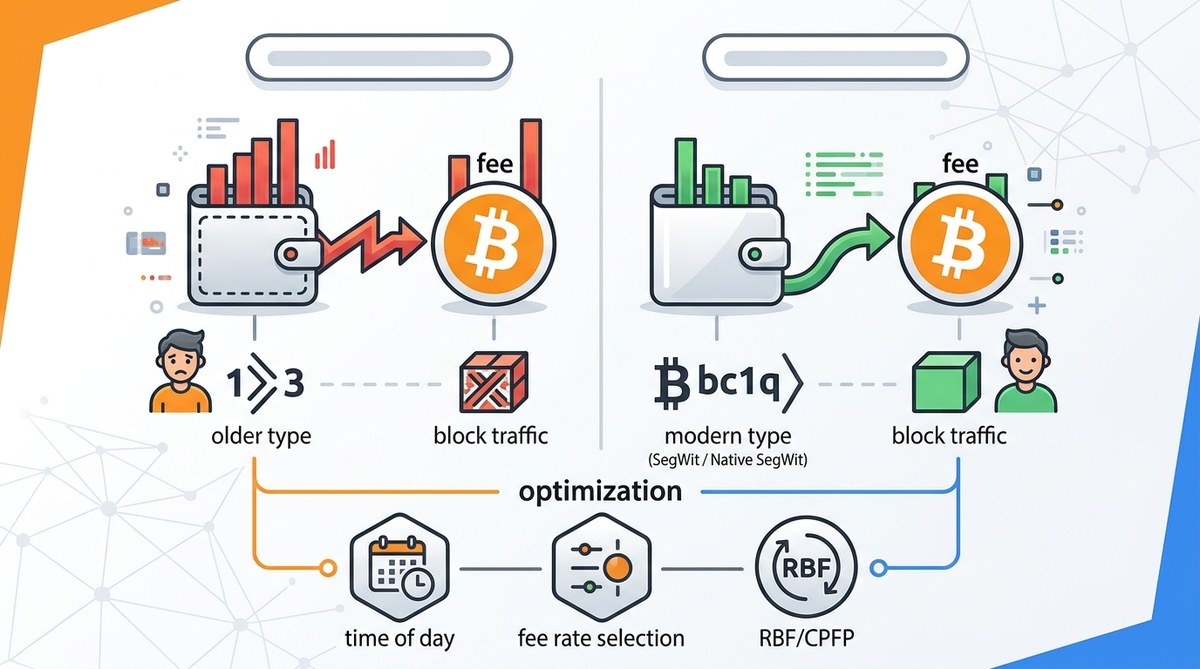
If you are still using an older Bitcoin address format, your transactions will be larger in bytes than someone using a modern format. This is one of the easiest fixes.
Here is a breakdown of the main address types and their impact on transaction size:
| Address Type | Starting Character | Typical Transaction Size | Relative Fee Cost |
|---|---|---|---|
| Legacy (P2PKH) | 1 | ~250 vbytes | Highest |
| SegWit (P2SH) | 3 | ~170 vbytes | Medium |
| Native SegWit (bech32) | bc1 | ~140 vbytes | Lower |
| Taproot (bech32m) | bc1p | ~135 vbytes | Lowest |
If your friend uses a Native SegWit or Taproot address and you use a Legacy address, your transaction will be almost twice as large. That means you will pay roughly twice as much in fees for the same fee rate.
Network Congestion Changes By the Hour
Bitcoin does not have bankers hours, but the people using it do. Network congestion follows patterns. Weekend evenings in the US tend to be quieter. Weekday mornings in Asia can spike fees as activity picks up.
Your friend might have sent their transaction on a Sunday afternoon when the mempool was nearly empty. You might have sent yours on a Tuesday morning during a wave of activity from a popular NFT drop or exchange movement.
How to time your transactions for lower fees
- Check a mempool visualization tool before you send. Look for the number of unconfirmed transactions waiting.
- If the mempool is above 50,000 unconfirmed transactions, wait if you can.
- Send during US nighttime or weekend afternoons when fewer people are actively trading.
- Avoid sending right after a major price movement. Fees spike when people rush to buy or sell.
- Use a wallet that lets you see current network conditions before you confirm the send.
The Mistakes That Inflate Your Fees Most
Many people make the same errors over and over. Here are the most common ones that lead to a higher Bitcoin transaction fee:
- Using the default fee setting without checking if you actually need fast confirmation
- Sending from an exchange that charges a flat withdrawal fee on top of the network fee
- Not consolidating your UTXOs (unspent transaction outputs) during low fee periods
- Creating transactions with many small inputs because you received many small payments
- Using a wallet that does not support SegWit or Taproot addresses
- Sending during known high-traffic events like halvings or major exchange listings
A Step-by-Step Plan to Lower Your Next Fee
You can fix this starting with your next transaction. Here is the process:
- Open your wallet settings and look for the fee customization option. If your wallet does not let you set a custom fee, consider switching to one that does.
- Check the current mempool congestion on a fee estimator site. Note the recommended fee rate for a 1-block confirmation and for a 6-block confirmation.
- Decide how fast you actually need the transaction to confirm. If you are buying a coffee, you can wait an hour. If you are closing a real estate deal, you want the next block.
- Set your fee rate manually to the lowest rate that still shows a high probability of confirmation within your desired time frame.
- If your wallet allows it, enable Replace-by-Fee (RBF). This lets you bump the fee later if the transaction gets stuck.
- Consider using a Lightning Network wallet for small everyday payments. Lightning fees are often a fraction of a cent.
For a deeper look at how to set custom fees and avoid common pitfalls, check out this guide on how to set custom Bitcoin fees in your wallet.
What About Using a Different Cryptocurrency Altogether?
If you find yourself constantly frustrated by Bitcoin fees, it might be worth looking at alternatives designed for lower cost transactions. Bitcoin Cash was created specifically to address the fee problem. Its block size is larger, which means the network can handle more transactions without congestion driving up fees.
For daily spending, many people are turning to Bitcoin Cash for its near-zero fees. You can send $1 for a fraction of a cent. If your main use case is moving small amounts of value, it is worth understanding the differences. Read more about why Bitcoin Cash offers lower fees for everyday transactions.
A Final Comparison: You Versus Your Friend
Let us put all the pieces together with a concrete example.
You sent $50 from a Legacy wallet during a busy Tuesday morning. Your wallet had to combine 4 small inputs from previous transactions, making the transaction size 450 vbytes. The wallet used the default “Normal” fee setting of 30 sat/vb. Your total fee was 13,500 satoshis, or about $8 at current prices.
Your friend sent $50 from a Native SegWit wallet on a quiet Sunday afternoon. Their wallet had 1 input and 2 outputs, making the transaction size 140 vbytes. They manually set the fee to 5 sat/vb because the mempool was nearly empty. Their total fee was 700 satoshis, or about $0.42.
Same dollar amount. Same network. Huge difference in cost. The difference came down to address type, transaction size, timing, and fee setting.
Taking Control of Your Bitcoin Costs
You do not need to be a blockchain engineer to pay less. You just need to be intentional. Switch to a modern wallet that supports Native SegWit or Taproot. Learn to read a mempool chart. Take the time to set your fee manually instead of accepting the default. And if you are sending small amounts regularly, consider using a second-layer solution like Lightning or an alternative network like Bitcoin Cash.
Your friend is not lucky. They just know the system. Now you do too. Your next transaction can cost a fraction of what you paid last time. The tools are free. The knowledge is free. The only thing that changes is the fee you choose to pay. For more detailed strategies on timing and fee estimation, check out this guide on how to time your Bitcoin transactions for the lowest fees in 2026.








Leave a Reply