

Your wallet says the fee is $2.50. You hit send. Then you check the mempool and realize you could have paid $0.80 for the exact same confirmation time. That gap is not bad luck. It is by design. Most Bitcoin wallet fee estimators in 2026 are built for convenience, not for your wallet balance. They pick a number that works most of the time, even when it means overpaying by two or three times the necessary rate. The good news? You do not need to become a blockchain engineer to fix this. You just need to know what your estimator is hiding, and how to take back control.
Bitcoin wallet fee estimators in 2026 prioritize speed over savings. They use broad averages that ignore real-time mempool conditions, transaction size, and network volatility. By learning to read the actual fee market and adjusting your wallet settings manually, you can cut costs by up to 70 percent without slowing down confirmations. Stop accepting the default number.
Why Your Wallet’s Default Number Is Wrong
Wallet apps want one thing from a fee estimator: no support tickets. If your transaction gets stuck for six hours, you blame the wallet. So they build in a buffer. That buffer is your money.
Most estimators in 2026 use a simple formula. They look at the last few blocks, calculate an average fee rate, then add a safety margin of 20 to 50 percent. This approach works, but it is lazy. It treats every transaction the same, whether you are sending $20 or $20,000.
The real fee market is far more nuanced. Miners prioritize transactions based on satoshis per byte (sat/vB), not the total fee you pay. A small transaction with a high rate can confirm faster than a large one with a lower rate. Your wallet’s estimator rarely tells you this because it wants to keep things simple.
Another issue is timing. Your wallet might update its fee suggestions every few minutes, but the mempool changes every second. During a spike, the default suggestion lags behind reality. During a lull, it stays artificially high. Either way, you lose.
What the Estimator Does Not Show You
Let’s break down the hidden variables that your wallet’s fee estimator 2026 likely ignores. These are the factors that separate a smart spender from someone who just clicks “send.”
- Transaction size (vBytes): The number of inputs and outputs matters. A wallet with many small UTXOs (unspent transaction outputs) creates a larger transaction, which costs more. Estimators assume an average size, not your actual size.
- Mempool depth: The number of pending transactions waiting in line. A deep mempool means higher competition. A shallow one means you can pay less. Your wallet might not check this in real time.
- Block space demand: Some hours of the day are busier. US evening hours and Asian trading sessions often see spikes. Your wallet’s flat fee does not account for this rhythm.
- Fee rate volatility: The gap between the lowest and highest fee rates in the mempool can be massive. Estimators often default to the high end.
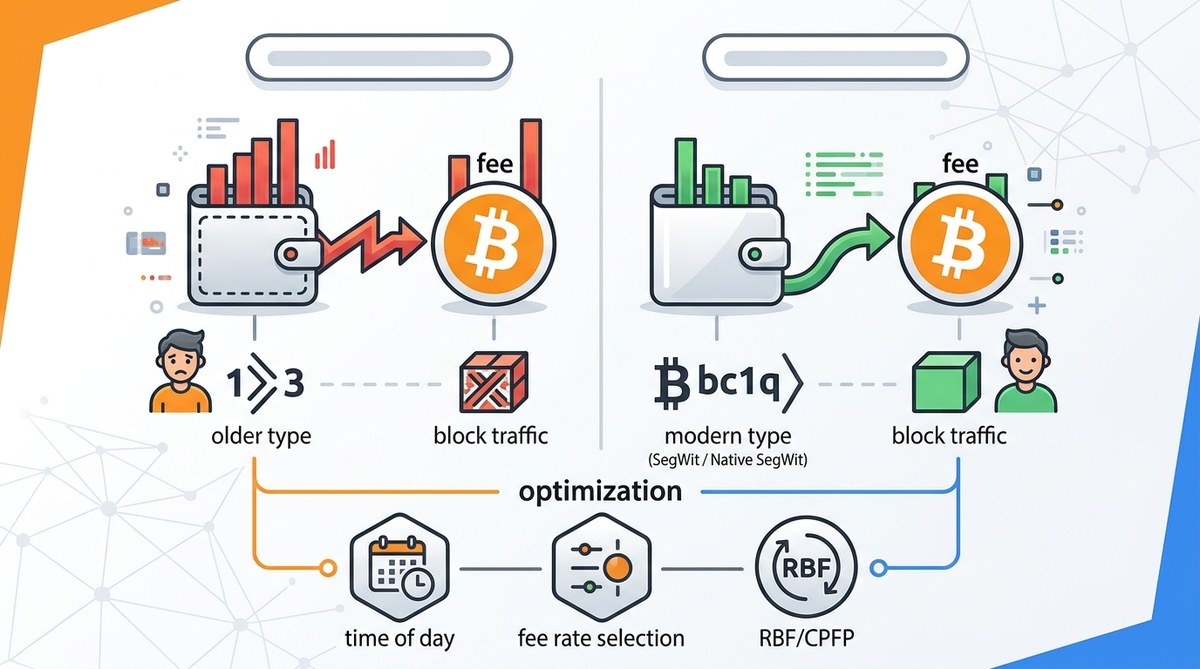
- SegWit usage: Segregated Witness addresses are cheaper because they reduce transaction weight. If your wallet does not use SegWit, you are paying extra on every single transaction.
| Factor | What Your Estimator Assumes | What Actually Happens |
|---|---|---|
| Transaction size | Average around 226 vBytes | Yours could be 150 or 400 vBytes |
| Mempool status | Static snapshot | Changes every 10 minutes |
| Fee rate | Middle of the range | Often 30% lower is enough |
| SegWit | Always enabled | Many wallets still use legacy addresses |
| Timing | Constant 24/7 | Weekends are usually cheaper |
How to Read the Real Fee Market
You do not need a fancy terminal to understand what is happening. Public tools show the mempool in plain language. The trick is knowing what to look for.
The most important number is the fee rate measured in sat/vB. This tells you how much you pay per unit of transaction weight. A rate of 10 sat/vB on a 200 vByte transaction costs 2,000 sats. At current prices, that is a fraction of a dollar. During peak congestion, that same rate might be 50 sat/vB or higher.
Next, check the mempool backlog. If there are only a few thousand transactions waiting, you can use the lowest rate and still confirm within a block or two. If the backlog is over 100,000, you need to be more aggressive.
Finally, look at the fee distribution chart. This shows how many transactions are waiting at each fee rate. If most transactions are clustered at 5 sat/vB, setting yours at 6 sat/vB puts you ahead of the pack without paying the top rate.
The Real Cost of “Fast” Settings
Many wallets offer presets: economy, normal, and priority. The names sound helpful, but they are designed to make you feel in control while still padding the bottom line.
The “priority” setting is the worst offender. It often charges double or triple the rate needed to get into the very next block. In most cases, the “normal” setting confirms just as fast because miners are not machines that only pick the highest fee. They include lower-fee transactions when block space allows.
Here is a practical way to think about it. During a typical weekday in 2026, the difference between a 1-block confirmation and a 6-block confirmation might be 5 sat/vB. That difference could cost you an extra $1.50 on a standard transaction. It adds up fast if you move money regularly.
The same logic applies to the “economy” setting. It might save you money, but it can also leave you waiting for hours during a spike. The trick is knowing when to use it and when to avoid it. Understanding bitcoin network congestion and how to avoid high fees is the first step to smarter spending.
A Better Way to Set Fees Manually
You can bypass the estimator entirely. Most wallets allow custom fee settings. It takes a little practice, but the savings are worth it.
- Check the mempool before you send. Open a fee tracker and look at the current recommended rate for your desired confirmation time.
- Add a small buffer of 2 to 3 sat/vB. This protects you from sudden spikes without overpaying.
- Set your fee manually in the wallet’s custom settings. Do not use the presets.
- Monitor your transaction for the first 10 minutes. If it does not confirm, you can use Replace-by-Fee (RBF) to bump it up.
- Learn from each transaction. Note the time of day, the fee rate you used, and how long confirmation took. Patterns will emerge.
This process takes about two minutes. That is less time than you spend scrolling through your phone in the checkout line. And it saves real money.
When the Estimator Is Actually Right
To be fair, the estimator is not always wrong. There are moments when the default fee is spot on. These usually happen during quiet periods when the mempool is nearly empty and block space is abundant.
If you are sending a transaction at 3 AM on a Sunday and the mempool is clear, the default fee is probably fine. You could still save a few cents by going lower, but the effort might not be worth it.
The real problem is that the estimator cannot tell you when those quiet periods are. It applies the same logic all day, every day. That is why you need to be the one who decides.
Common Mistakes That Inflate Your Costs
Even experienced users make these errors. Avoid them and you will instantly pay less.
- Sending from an exchange directly to another exchange. This often triggers extra network hops and larger transaction sizes. Use a wallet in between.
- Ignoring UTXO consolidation. If you have many small deposits, your transaction becomes huge. Consolidate during low-fee periods.
- Using legacy addresses. SegWit addresses (starting with bc1) are cheaper. Make sure your wallet generates them.
- Paying for speed you do not need. If you are sending money to your own wallet, a 30-minute wait is fine. Do not pay for a 10-minute confirmation.
- Not using RBF. If you set a fee too low, RBF lets you fix it without starting over. Many wallets support it.
The Psychology of Fee Overpayment
There is an emotional component here. When you send Bitcoin, you want it to arrive. The fear of a stuck transaction makes you willing to overpay. Wallet developers know this. They design their estimators to exploit that anxiety.
The truth is that most transactions confirm even with a modest fee. The network is not as fragile as the warnings suggest. Yes, there are congestion events, but they are the exception, not the rule.
If you want to protect yourself without overpaying, use RBF. It gives you a safety net. Set a reasonable fee, and if the transaction stalls, bump it up. You lose nothing. You only pay for the speed you actually need.
Tools That Help You Pay Less
You do not need to guess. Several tools give you real-time data on the fee market. Use them alongside your wallet’s built-in estimator.
- Mempool.space: The gold standard for visualizing pending transactions and fee rates.
- Bitcoin Fees: A simple page that shows current rates for different confirmation speeds.
- Your wallet’s RBF feature: If it supports it, this is your best tool for avoiding overpayment.
- Lightning Network: For small, frequent payments, Lightning fees are near zero. Consider moving some funds there for daily spending.
The top tools to track network performance and minimize transaction fees can make a big difference in your monthly costs.
How to Automate Your Savings
If manual fee setting feels like too much work, there are ways to automate the process. Some wallets now offer dynamic fee algorithms that actually read the mempool in real time. They are not perfect, but they are better than the old static estimators.
Look for wallets that let you set a maximum fee cap. This ensures you never pay above a certain rate, even during a spike. Combine that with RBF, and you have a system that is both cheap and reliable.
Another option is to use a service that batches transactions. This is more common for businesses, but some power users do it manually. By combining multiple payments into one transaction, you split the cost across all recipients.
What to Do Right Now
Start small. The next time you send Bitcoin, do not hit the default button. Open a fee tracker, look at the current rates, and set your fee manually. Use a rate that is slightly above the lowest tier. Watch what happens.
You will likely see your transaction confirm in the same amount of time as before. The only difference is that you kept a few extra dollars in your pocket. Over a month of regular use, those dollars become significant.
The Future of Fee Estimation
The tools are getting better. Some wallets are experimenting with machine learning models that predict fee trends based on historical data and current market conditions. These are promising, but they are not widely available yet.
Until then, the burden is on you. Your wallet’s fee estimator 2026 is a starting point, not a final answer. Treat it that way and you will never overpay again.
Your Wallet Is Not Your Enemy, But It Is Not Your Friend Either
Your wallet’s fee estimator is a tool. It is designed to be safe, not cheap. That distinction matters. When you understand it, you stop treating the default fee as a fact and start treating it as a suggestion.
The next time you send Bitcoin, take a breath. Check the mempool. Set your own fee. Use RBF as your safety net. You will save money, and you will learn something about how the network actually works.
Bitcoin is about financial sovereignty. That includes not paying more than you have to. How to reduce bitcoin transaction fees without compromising speed in 2026 is the guide you need to make that happen. Your wallet will still work fine. You will just be smarter about how you use it.










Leave a Reply